ReadyAED

One place for every AED you look after

Monthly checks on a phone, readiness at a glance, parts that show up before they expire, rescue and restock, and the records your auditor asks for. In the browser, for AEDs of any brand.

Every AED, its status and the reason

Each AED is always Ready, Attention or Not ready, worked out from its records and its latest check. Hover any status in the app and it explains what it means.

Ready

Nothing to do.

The AED would work in a rescue today, and its records say so.

  • Pads and battery in date
  • Checked in the last 31 days
  • No open problems
Attention

Works today. Something is due.

Fix it on your schedule, before it becomes a problem.

  • "Pads expire in 12 days" (30 days before)
  • Monthly check overdue, or never done
  • No pads or battery recorded
  • Signage, cabinet or rescue kit answered No
Not ready

Can't be relied on today.

It goes to the top of your list, with the reason and what to do.

  • Pads or battery past their expiry date
  • A critical item answered No on the last check
  • Used in a rescue and not restocked

Try the rules yourself

200 days
500 days
12 days ago
Last check answers
Rescue
RA200109Riverside Middle · Front office · Cardiac Science G5
Ready

Nothing to do.

    The same rules the app uses. On the expiry date itself the AED shows Attention ("expires today"); it turns Not ready the day after. Attention still counts as rescue-ready, because the AED works today.

    The home screen starts with what to do.

    • A readiness ring with your Ready, Attention and Not ready counts, each one a link to the list.
    • Needs you: the most urgent AEDs, each with one action, such as Check now or Replace parts.
    • Site health, worst site first, so you know where to go today.
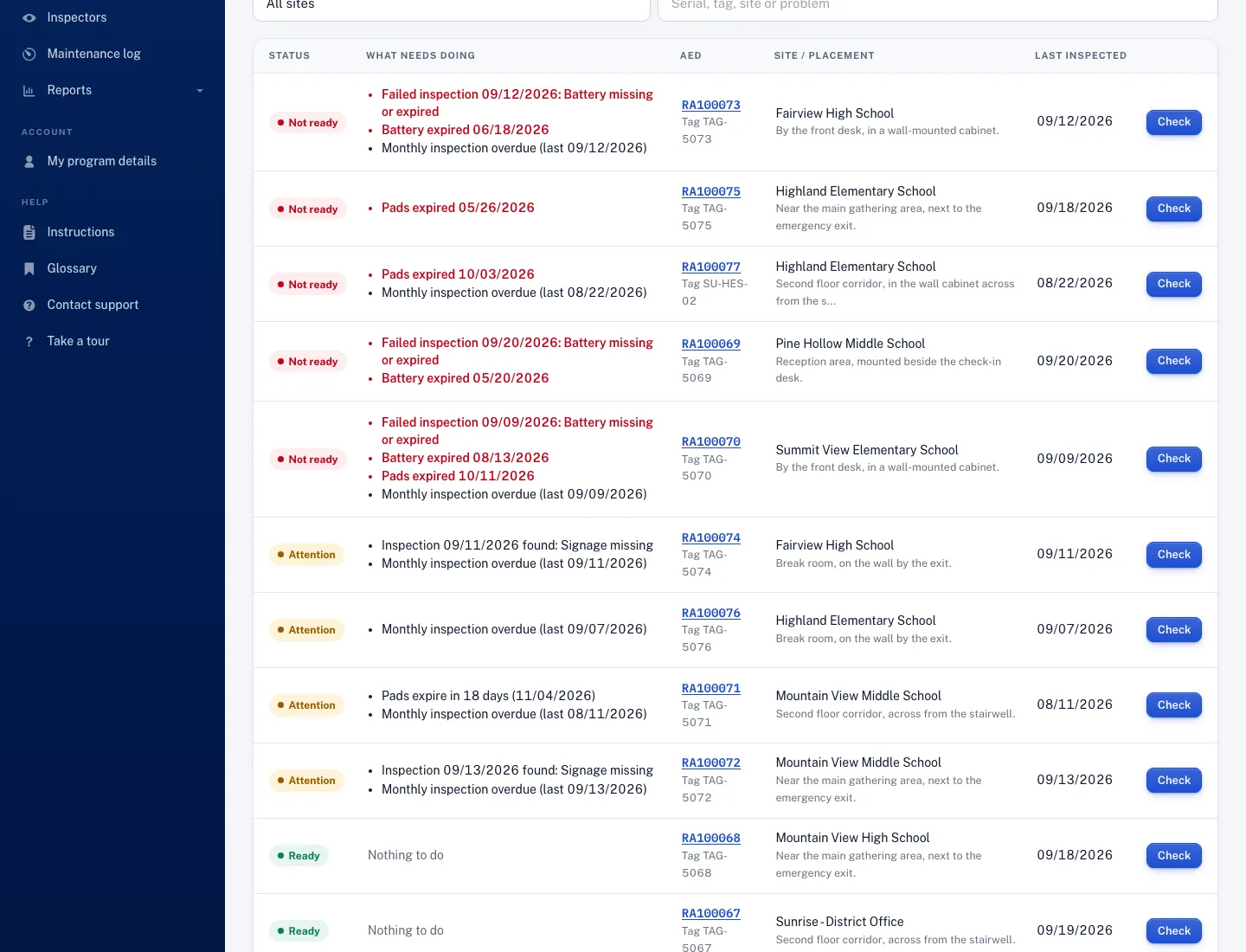
    • The AED readiness page: every AED with what needs doing. Filter it, search it, or download it as a CSV. Try it below.

    The rescue-ready score is the share of your AEDs that are not Not ready. Attention still counts, because the AED works today.

    Find an AED, site or page⌘ K
    DPDana Price
    Overview
    Dashboard Monthly checks7 AED readiness
    Your program
    AEDs Sites Inspectors Maintenance log Reports
    AED readiness

    Every AED you're responsible for, and exactly what needs doing.

    8 AEDs
    Sample AED readiness list
    StatusWhat needs doingAEDSite / placementLast inspected
    Not ready
    • Pads expired 10/14/2026
    RA200118Tag LE-01Lincoln ElementaryGym lobby, left of the double doors10/02/2026
    Not ready
    • Used in a rescue 10/12/2026, not restocked
    RA200131Tag NH-07Northfield HighPool deck, by the lifeguard stand10/05/2026
    Attention
    • Monthly inspection overdue (last 09/02/2026)
    RA200124Tag LE-04Lincoln ElementaryLibrary entrance09/02/2026
    Attention
    • Pads expire in 12 days (10/30/2026)
    RA200127Tag NH-02Northfield HighMain office, behind reception10/03/2026
    Attention
    • Inspection 10/06/2026 found: Signage missing
    RA200133Tag NH-09Northfield HighStadium gate B10/06/2026
    Attention
    • Never checked
    • No battery recorded
    RA200145Tag DO-03District officeBus depot, driver roomNever
    ReadyNothing to doRA200109Tag RM-01Riverside MiddleFront office10/09/2026
    ReadyNothing to doRA200140Tag DO-01District officeReception10/11/2026

    Sample data. The list on the readiness page really does filter and search.

    Three taps at the AED, and a record nobody can rewrite

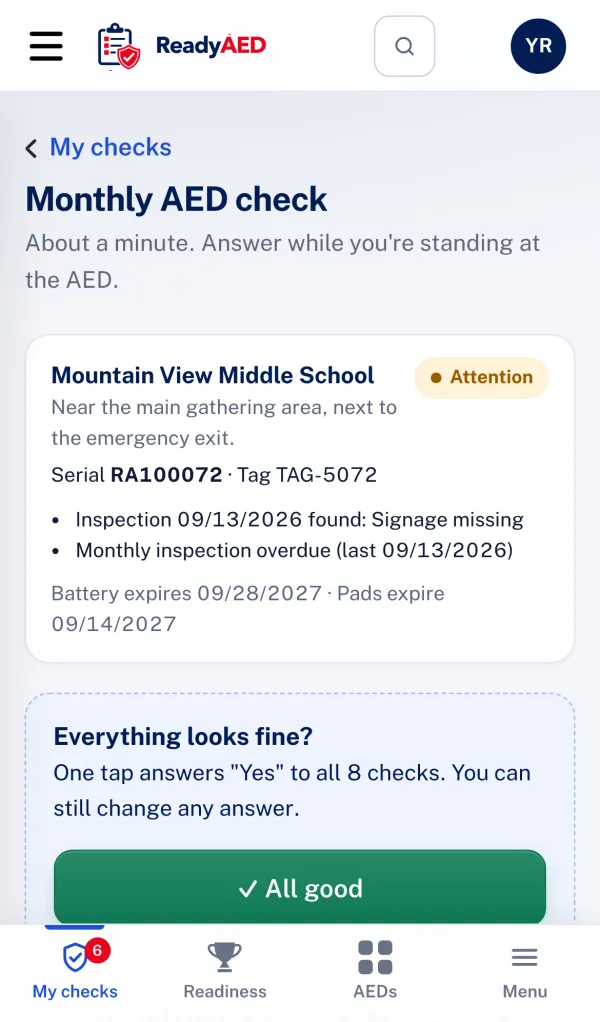
    Inspectors open My checks, or scan the QR label on the AED. Eight items, each answered Yes, No or N/A. If everything is fine, All good answers Yes to all eight in one tap. Try it on the phone.

    • Critical: status indicator shows the AED is ready; pads connected or sealed and in date; battery installed and in date; no visible damage, cracks, moisture or warning messages; AED in its place, visible and not blocked.
    • Minor: signage in place and visible; cabinet intact and its alarm works (if fitted); rescue kit present (gloves, razor, scissors, CPR mask).
    • A critical No turns the AED Not ready. A minor No turns it Attention. It stays that way until a newer check passes.
    • After saving, the next AED due at the same site is one tap away.
    ‹ My checks Monthly AED check About a minute. Answer while you're standing at the AED.
    Lincoln ElementaryAttention
    Library entrance, on the wall by the returns desk Serial RA200124 · Tag LE-04 Monthly check overdue (last 09/02/2026)

    Everything looks fine?One tap answers Yes to all 8 checks. You can still change any answer.

    Status indicator shows the AED is ready (green light, "OK" or check mark) (critical)

    Pads are connected or sealed in their package, and in date (critical)

    Battery is installed and in date (critical)

    No visible damage, cracks, moisture or warning messages (critical)

    AED is in its place, visible and not blocked (critical)

    AED signage is in place and visible

    Cabinet is intact and its alarm works (if fitted)

    Rescue kit is present (gloves, razor, scissors, CPR mask)

    * "No" on a starred item marks the AED Not ready until a later check passes.

    QR labels from every AED

    Print a label from the AED's page. Scanning it opens that AED's monthly check, with nothing to look up.

    Notes and photo evidence

    Add a note or a photo when something is wrong. Photos are stored privately and shown only to people who can see that AED.

    Time set by the server

    Every check records each answer, notes, the photo, who did it and the exact time. Submitting confirms they checked it in person. Checks are never edited or deleted.

    See what is due before it expires

    Pads and battery expiry dates live on every AED. Coming up lists every part that expires in the next 90 days with an order-by date 45 days ahead. Thirty days out the AED moves to Attention. It turns Not ready once a part is past its expiry date.

    • Record the new expiry date and the AED returns to Ready, with no manual step.
    • An AED with no pads or battery recorded shows Attention until they are.
    • The maintenance log lists expired and upcoming parts across your program.

    One page per AED, with everything about it

    Status and reasons, battery and pads with expiry bars, key dates, its printable QR label and a map link. Tabs hold its checks, rescues, change log and responders. Click the tabs.

    Find an AED, site or page⌘ K
    DPDana Price
    Overview
    Dashboard Monthly checks7 AED readiness
    Your program
    AEDs Sites Inspectors Maintenance log Reports
    HeartSine · samaritan PAD 360P
    RA200127Attention
    Northfield High · 400 Northfield Ave
    Main office, behind reception.  Tag NH-02
    What needs doing

    Pads expire in 12 days (10/30/2026)

    Battery and pads Update
    Batterysamaritan PAD battery and pad cartridgeExpires in 2 years 4 months
    (02/14/2029)
    PadsAdult electrode padsExpires in 12 days
    (10/30/2026)
    Passed · 10/03/2026 8:12 AMMaria Alvarez
    Passed · 09/04/2026 7:58 AMMaria Alvarez
    Signage: No · 08/05/2026 3:40 PMChris Okafor · Note and photo attached
    Key dates
    Last checked
    10/03/2026
    Next check due
    11/03/2026
    Battery expires
    02/14/2029
    Pads expire
    10/30/2026
    Installed
    03/17/2021
    QR label
    Stick this on or beside the AED. Scanning it opens this AED's monthly check.Print label

    Sample data. Serial and tag numbers are set in a typewriter face, like the label on the device.

    After a rescue, the AED can't quietly go back on the wall half ready

    "Was this AED used in a rescue?" sits on its check page. Record the date, whether a shock was given and the emergency services reference, whether that is 911, 999, 112 or another local number.

    Not ready until restocked

    The moment a rescue is reported, the AED shows Not ready everywhere, with the reason.

    New pads required

    Mark restocked is refused until new, in-date pads are recorded on that AED.

    A check confirms it

    After restocking, ReadyAED opens the monthly check so someone confirms the AED is rescue-ready. Every rescue appears in the compliance pack.

    The records are the product

    When an auditor, an insurer or your board asks whether your AEDs are looked after, the answer is one download, and every record behind it can't be rewritten.

    Compliance pack (PDF)

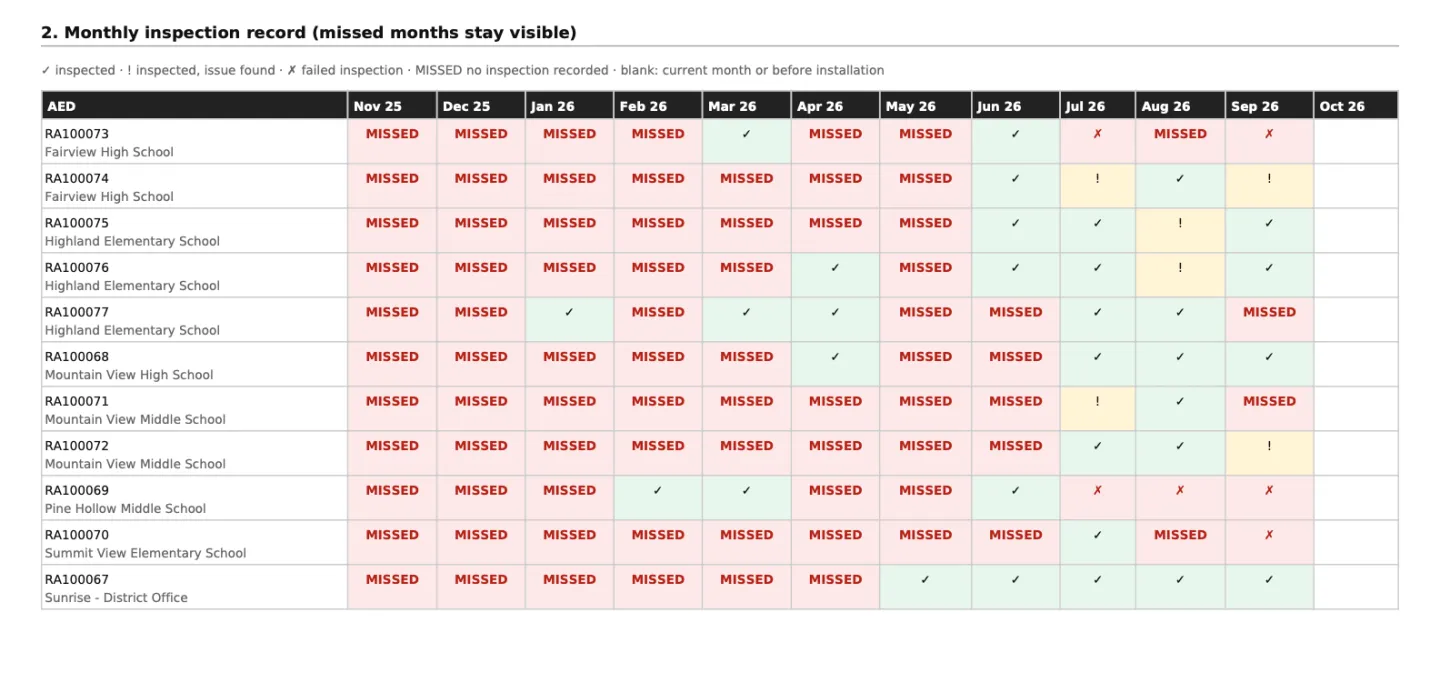
    Current status, a 12-month check grid where missed months stay red, every check with its signer, and every rescue.

    Readiness CSV

    The same list as the readiness page, ready for a spreadsheet.

    Change history New

    Who changed what and when, with before and after values, in the reader's own timezone. Passwords and tokens are never shown.

    Monthly reports

    Per report group, as PDF or Excel. Plus the maintenance log export and printable QR labels.

    AED compliance pack

    Northfield School District
    Nov 2025 to Oct 2026
    Printed 15 Oct 2026
    Monthly checks, last 12 months
    NDJFMAMJJASOGym lobbyLibrary entranceMain officePool deckStadium gate B
    Checks and signers
    Gym lobby · All 8 items YesM. Alvarez02 Oct 2026 08:14
    Library entrance · AED signage: NoJ. Chen01 Oct 2026 15:02
    Pool deck · All 8 items YesR. Okafor30 Sep 2026 10:47

    Roles that match how your program runs

    Four roles, each with exactly the access it needs. Access is checked by the server on every request, so someone who guesses another organization's link gets "not found".

    Inspector

    Staff who walk up to the AED each month

    • Sees only assigned sites
    • Does checks
    • Reports a rescue, marks restocked

    Coordinator

    The safety lead who owns the program

    • Sees every AED in the organization
    • Invites inspectors by email and assigns sites
    • Downloads the compliance pack

    Sub-manager

    A coordinator for part of a program

    • The coordinator's tools
    • Limited to their own sites, such as one campus

    Administrator

    The ReadyAED team

    • Sets up your account
    • Can open your view to help, when you ask

    Responders and their certifications.

    Keep a list of the trained responders near each AED. The readiness page lists CPR and AED certifications that have lapsed or expire in the next 90 days, and each AED's Responders tab shows "Certified until" or "Certification lapsed".

    Quick find, and dates in your own format

    Small things that make a big program easy to run.

    Quick find New

    Press Ctrl K or ⌘ K, or the / key, anywhere in ReadyAED. Find any AED by serial, tag, placement or site, plus sites and pages. It only shows what you are allowed to see. Type in the box to try it.

    Esc
    • RA200109Riverside Middle · Front office
    • RA200118Lincoln Elementary · Gym lobby, left of the double doors
    • RA200124Lincoln Elementary · Library entrance
    • RA200127Northfield High · Main office, behind reception
    • RA200131Northfield High · Pool deck, by the lifeguard stand
    • RA200133Northfield High · Stadium gate B
    • RA200140District office · Reception
    • RA200145District office · Bus depot, driver room
    • Lincoln Elementary8 AEDs
    • Northfield High12 AEDs
    • Riverside Middle9 AEDs
    • District office5 AEDs
    • AED readinessEvery AED and what needs doing
    • Maintenance logExpired and upcoming parts
    • Monthly checksWhat is due this month
    • PreferencesTimezone and date format

    Your timezone, your date format New

    Each person sets their own timezone and date format, and the coordinator sets the default for the organization. Times in the change history follow the person reading it. Pick a format and every sample date on this page changes.

    Date format

    Pads expire
    10/30/2026
    Last checked
    10/03/2026
    Order by
    11/25/2026

    Help tips New

    A small next to headings and buttons explains each thing in plain words. Hover or focus it.

    Made for phones

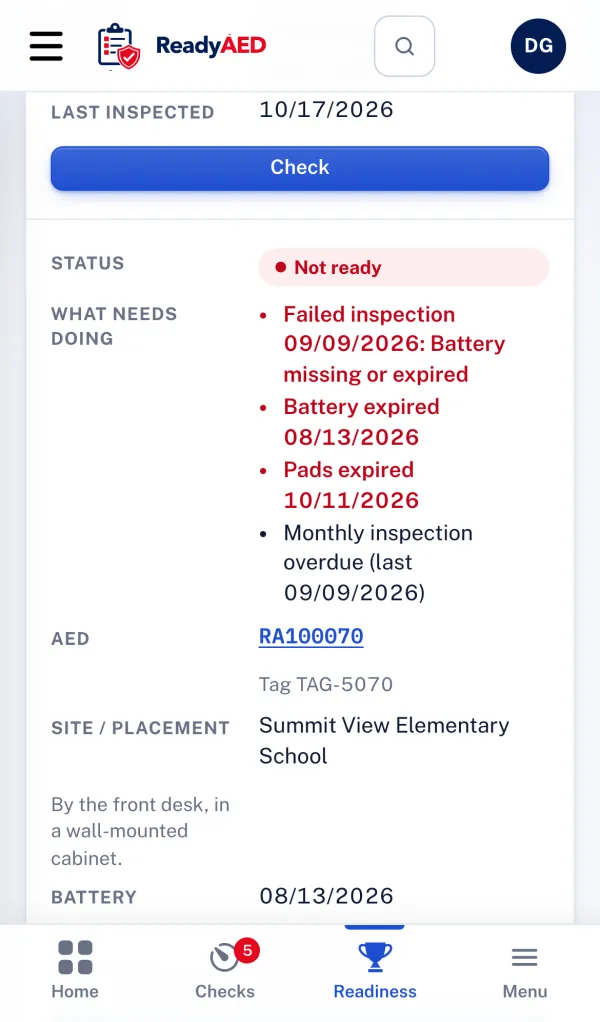
    On a phone every table becomes labelled cards, the bottom tab bar keeps checks one tap away, and All good fills the width of the screen.

    Programs of any shape

    Organizations and sites, from a single building to a district or a multi-site company. Any make and model, with serial, tag, placement, pads and battery.

    Screens from the app itself

    Everything above is drawn from these. Taken from the app with a made-up school district.
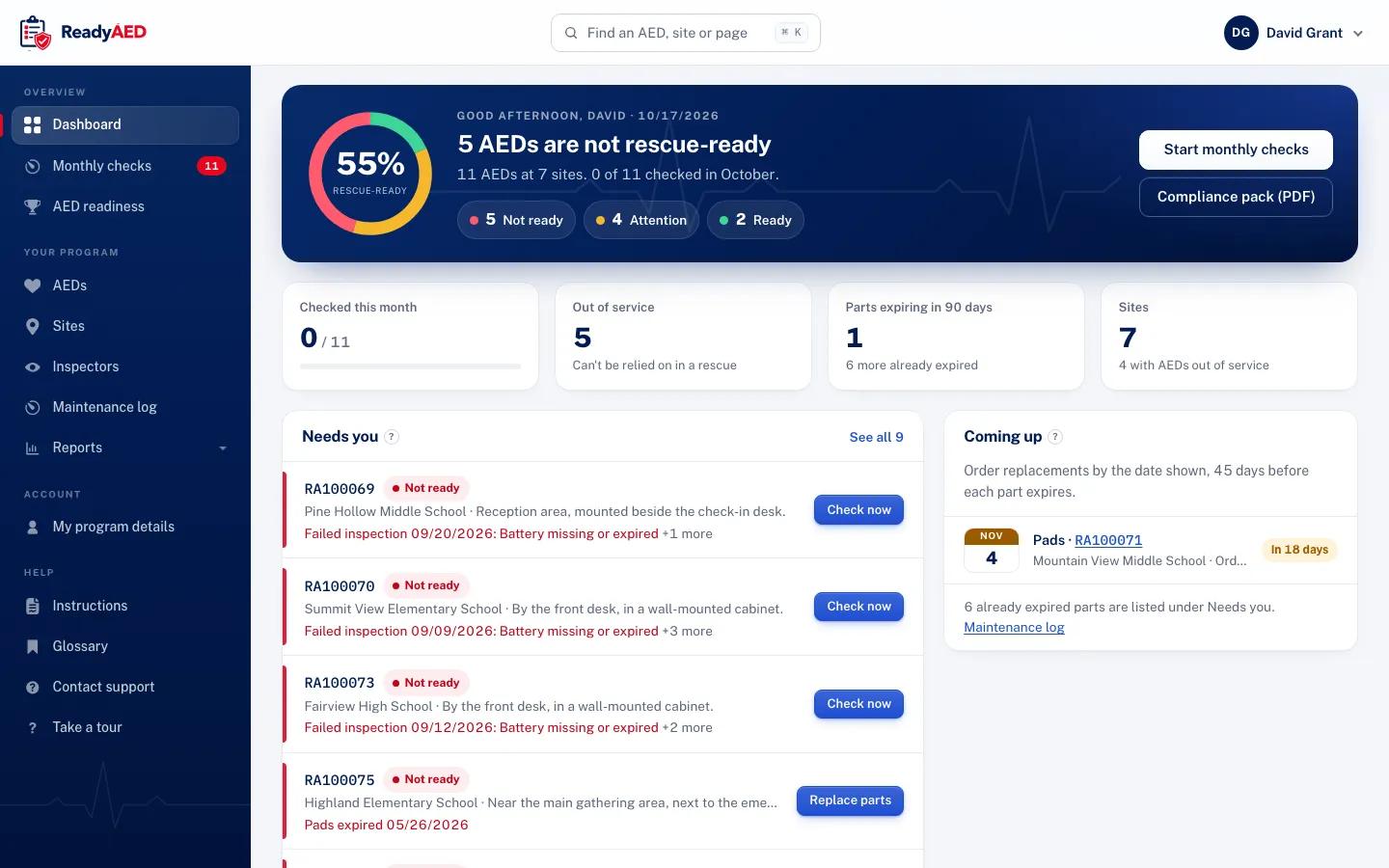
    ReadyAED home screen on a desktop: a navy banner with a readiness ring showing 55 percent rescue-ready, 5 Not ready, 4 Attention and 2 Ready, buttons for Start monthly checks and Compliance pack, four number cards, a Needs you list with Check now and Replace parts buttons, and a Coming up list with an order-by date.
    Home screen. Readiness ring, Needs you and Coming up, for a sample district with work to do.
    The monthly AED check on a phone: the AED's school, placement, serial and tag, an Attention status with its reasons, and a green All good button under the question Everything looks fine.
    Monthly check on a phone. All good answers Yes to all eight.
    The AED readiness page: rescue-ready percentage and counts for Ready, Attention and Not ready, a site picker and find box, and a table of AEDs with their status, what needs doing, serial and tag, site and placement, last inspection date and a Check button.
    AED readiness. Every AED and exactly what needs doing.
    The readiness list on a phone shown as a labelled card: Not ready, what needs doing in red, the AED serial, the site and placement, and a Check button.
    Tables become cards on a phone.
    Compliance pack PDF page titled Monthly inspection record, missed months stay visible: a grid of AEDs by month from November 2025 to October 2026, with ticks for inspected months, exclamation marks for issues found, crosses for failed inspections and MISSED in red where no check was recorded.
    The compliance pack's 12-month grid. Missed months stay visible. A sample district that started late.
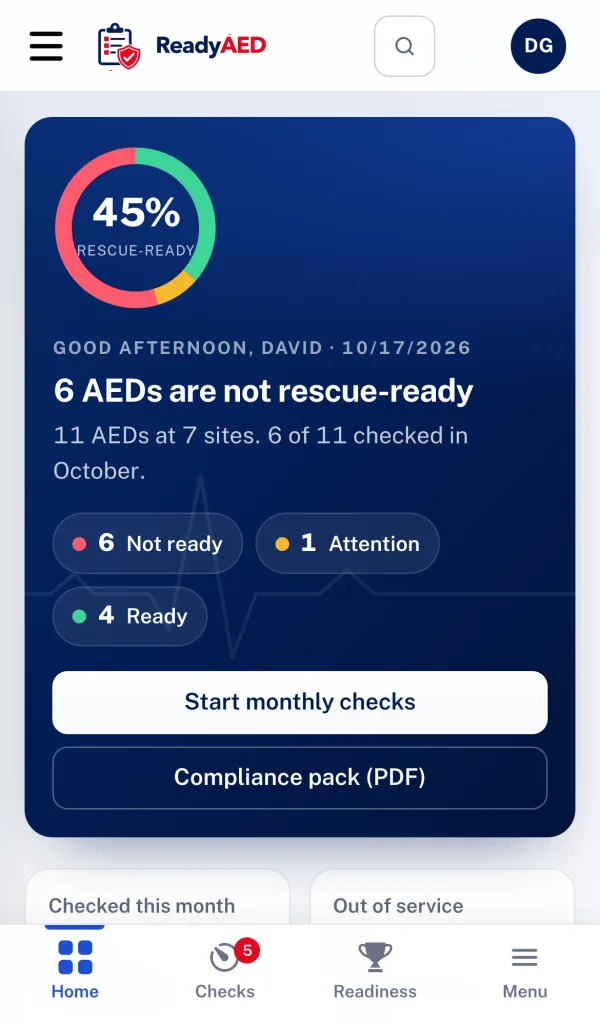
    The home screen on a phone: a readiness ring, the headline 6 AEDs are not rescue-ready, counts for Not ready, Attention and Ready, and buttons for Start monthly checks and Compliance pack.
    Home on a phone.

    Try ReadyAED with your own AEDs

    Start free with up to 3 AEDs, or tell us about your program and we will send a quote. Prefer a walkthrough? Book a demo.